

Key Takeaways
- Your marketing site probably doesn’t need WordPress in production. I build in WordPress locally, export static files with Simply Static, and serve them on Cloudflare Pages for $0/month.
- WordPress can be the workshop, not the runtime. I keep the block editor and editable content in WordPress Studio on my machine, without running a public WordPress installation to serve the finished site.
- AI works better when you give it a system to work within. My design kit, generated WordPress theme, reusable block patterns, and markup checks give Cursor clear rules to follow and help keep pages consistent.
I built this setup because I wanted an agentic workflow for creating WordPress websites that I’d actually want to ship. I already had a design system, but I needed to make it work with WordPress blocks and themes.
Along the way, I ended up with a workflow that other WordPress creators can use, too. I’ve made a generic version of my brand kit available so you can fork it and adapt it to your own project.
Here’s how to put the pieces together.
One reason AI-generated websites often look generic is that the agent has to make too many design decisions as it goes.
Matt Cromwell
Founder, Roots & Fruit
PHASE 1: Build
The first step is to build the right foundation based on my Roots and Fruit design system. You can see the whole thing here: brand.rootsandfruit.com
Build
My design system builds my WordPress theme
The design system generates the theme and patterns, then I work in Studio to dial things in.
-
01
Core Design System (CDS)
Brand kit, style guide, colors, type, atoms, molecules, organisms, and pages.
-
02
CDS to WP Compiler
This converts your system into a WordPress theme complete with block defaults and patterns to build out dynamic layouts.
-
03
WordPress Studio
The local site loads the theme and patterns so I can dial it in carefully.

The design system focuses both on being a brand kit resource for anyone working with me or for sponsorships; but also on being an atomic design system.
I chose atomic design because I think it converts best into the WordPress design language; particularly when it comes to blocks and their relationship to patterns.
This is the source of my design system including the WordPress compiler:

But if you want to replicate this yourself, I created a generic version that you can fork and make your own.
Brand-agnostic core design system template: role-named CSS tokens, intrinsic layout primitives, a small component set, and a normative DESIGN.md contract for coding agents.
The first step is to establish your own visual rules. You don’t need to start with a huge design system. Begin with the basics: colors, typography, spacing, buttons, and the components you expect to reuse across your site.
The goal is to make those decisions once, then give your tools a reliable source to work from.
PHASE 2: Publish
This phase is why I was so determined to make this work in the first place. I wanted to do all my research and writing in Cursor, then tell it to build a page from my writing, and then ship it. That’s the workflow I wanted.
The only way to get there is that the system knows and understands blocks and they all work with your styles and patterns.
Publish
Write and edit locally, push live with an Agent
I work locally with WordPress and Cursor, but everything goes live as a static site just by telling my agent to “ship it!”.
-
01
Cursor
Cursor knows the system and can build any page I need.
-
02
Simply Static
When I’m ready to ship, Simply Static converts the site to a static site.
-
03
Cloudflare Pages
Cloudflare Pages are the perfect host for a flatfile site like this, and Cursor has a plugin to make this all easy.
The Magic of Simply Static
Next I figured that while I’m working locally I might as well just make it a static site and host it on Cloudflare Pages.
Simply Static is such a great and reliable plugin. Out of the box it just works. Of course, keep in mind that there are limits to what a static site in general can do – that’s no limitation of the plugin, that’s just static sites.
You’ll notice my email newsletter opt-in form. That of course wouldn’t work if it was a WordPress form plugin that generates submissions over PHP. So I had to create an endpoint to send those submissions to Mailerlite over their API. But honestly? That feels 10x more lightweight than installing a plugin and a Mailerlite extension just for one field and a submit button.
The Magic of Cloudflare Pages
Cloudflare Pages really do feel like magic. They also “just work”, and for a static site they scale and perform better than what you can get at much more expensive hosts.
Cursor has a Cloudflare “plugin” that I just turned on, authorized, and now I just tell Cursor to ship my local site and it’s done in seconds. Going from local to static to live on Cloudflare with a word really feels like living in the future.
I wasn’t paying a ton for this site, but $14/mo is still great to not have to pay if I can avoid it.
$14 a month
Cloudways, running WordPress on a public server just to serve a marketing site.
$0 a month
Cloudflare Pages on the free plan. WordPress stays on my machine.
The Magic of Static Sites
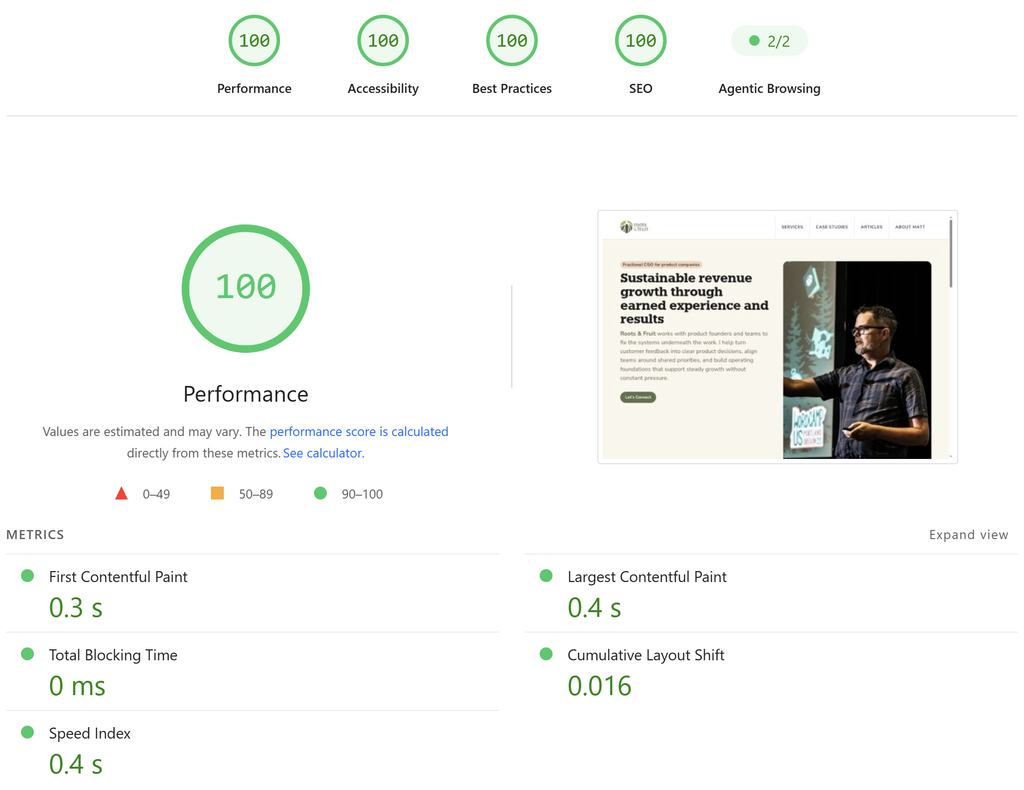
I didn’t set out on this to get perfect accessibility and performance scores; but I got there anyway!
Here’s my PageSpeed insights report public link:
Why I kept WordPress instead of moving to Astro
There’s a growing assumption that serious AI-powered web development means leaving WordPress behind for a modern framework. I think that’s getting it backwards.
The challenge with AI-generated websites isn’t getting an agent to produce code. It’s giving it the right system to work within so the result is maintainable, accessible, consistent, and ready for real use. That’s a point made well by the folks at WebDevStudios. Their site It Looks Done demonstrates how much of a production website’s real work sits beneath the polished interface. WordPress has spent decades building that foundation.
On every WordPress site I build or manage, I start with a small stack aimed at the same goal: give the agent a real environment, not a blank repo. I use the MCP Adapter with a dedicated, restricted user on live sites (not needed for this local-only workflow, but it’s part of how I work elsewhere). In Cursor I install the official WordPress development agent skills, and I’ve been leaning more on the WordPress Design System MCP as well. Those tools help, but honestly the design environment is most of the hard part.
My design kit builds on it. The compiler turns my design system into theme.json and reusable block patterns. WordPress gives Cursor a native vocabulary of blocks, templates, and content to work with. I can establish the rules once, then use the agent to build within them.
The block editor is a bigger advantage than it might seem. Content isn’t trapped in a pile of custom components I have to maintain in application code. I use native blocks, compose them into patterns, and edit in an interface built for that job. Templates keep the frame consistent; the page content stays flexible.
That’s a powerful development platform. And because I generate a static site with Simply Static, I don’t need to run WordPress on a public server to benefit from it.
I want more WordPress developers to recognize what’s possible here. We can build design systems specifically for agents, connect them to WordPress’s existing content architecture, and ship the result as static files. We don’t have to abandon WordPress to build websites with AI. We can make WordPress a better platform for doing it.
Are you going Static?
If you want to create your own design system; fork mine:
Brand-agnostic core design system template: role-named CSS tokens, intrinsic layout primitives, a small component set, and a normative DESIGN.md contract for coding agents.
If you want work with WordPress locally, try out WordPress Studio:
If you want to generate a static WordPress website, try Simply Static

If you want to host a static site really cheaply yet with high performance, try Cloudflare Pages:
But! If you want to grow your product business, you know where to find me.